Google Ads Optimization for Lead Generation

Share This Post

TL;DR

    Quick answers:

    Google Ads puts your business in front of people at the moment they search for what you sell. That is the easy part. The hard part is spending the budget well. A campaign left on default settings will still spend every dollar. Optimization is the work that decides whether those dollars buy leads or buy clicks that go nowhere.

    This guide is written for the operator running a live account. Each section is one lever, what it does, and when to pull it.

    Know Your Numbers Before You Touch a Setting

    You cannot optimize what you do not measure. Before you change a bid or pause a keyword, you need two things: clean conversion tracking and a sense of what good looks like.

    Clean tracking means Google counts a conversion only when a real business result happens. For a lead-gen advertiser, that is a submitted form or a qualified phone call, not a page view. If your conversion action is loose, every bid strategy that follows will optimize toward the wrong thing. Fix tracking first. Everything downstream depends on it.

    Once tracking is clean, compare your account to the market. According to WordStream’s 2024 Google Ads benchmarks, which analyzed more than 17,000 campaigns from April 2023 through March 2024, the average search campaign converts near 7 percent and pays roughly $67 for each lead. Your numbers will differ by industry. Use the table as a reality check, not a target.

    Metric (Google Search) All industries Finance & Insurance Home & Home Improvement
    Average click-through rate 6.42% 7.71% 5.59%
    Average cost per click $4.66 $3.00 $6.96
    Average conversion rate 6.96% 2.78% 8.62%
    Average cost per lead $66.69 $75.94 $82.27

    Source: WordStream 2024 Google Ads benchmarks, Search advertising, April 2023 through March 2024.

    Key Concept: A benchmark is a mirror, not a goal. If your cost per lead sits well above your industry average, the levers below are where the savings hide. If it sits below, protect what is working before you change it.

    Match the Bid Strategy to Your Goal

    Your bid strategy tells Google what to buy with your budget. Pick the wrong one and you optimize toward the wrong outcome. This is the single highest-leverage setting in most accounts.

    Smart Bidding uses Google’s automation to set bids in each auction. For most advertisers it now beats manual bidding on both effort and result, but only after conversion tracking is clean and the account has enough conversion history to learn from. The table below maps each common strategy to the job it does best.

    Bid strategy Best for What you set Watch out for
    Manual CPC Tiny budgets, tight control A max bid per keyword Does not scale; heavy hands-on work
    Maximize Clicks Early traffic, keyword discovery A daily budget Buys clicks, not conversions
    Maximize Conversions Steady lead volume, no CPA target yet A daily budget Can spend the full budget chasing volume
    Target CPA A known, stable cost-per-lead goal A target cost per conversion Set it too low and delivery stalls
    Target ROAS Revenue or value-based goals A target return on ad spend Needs accurate conversion values
    Performance Max Cross-channel reach with strong signals Assets plus audience signals Reports less detail; needs guardrails

    Table: Elevarus, informed by WordStream’s automated bidding guide and Search Engine Land.

    A concrete example for a lead-gen account: start on Maximize Conversions to build a base of conversion data. Once the campaign holds a stable cost per lead for about two weeks, switch to Target CPA and set the target near that recent cost per lead, tied to your form-submission conversion action. Raise the target when the campaign is limited by volume. Lower it only after two more weeks of stable data, in small steps, so you do not choke delivery.

    Google keeps improving how these strategies find new demand. Its Smart Bidding Exploration feature lets you set a return-on-ad-spend tolerance so campaigns can chase queries they would otherwise skip. Per Search Engine Land, Google reports an 18 percent increase in unique converting search query categories and a 19 percent increase in conversions for campaigns using it. Treat vendor-reported lifts as a reason to test, not a promise.

    Cut Wasted Spend With Match Types and Negative Keywords

    The fastest way to lower cost per lead is to stop paying for the wrong clicks. Match types control how loosely Google maps a search to your keyword. Broad match reaches the most searches and wastes the most budget without guardrails. Phrase and exact match hold a tighter line. Most lead-gen accounts do best with a mix: a controlled broad-match campaign under Smart Bidding, plus phrase and exact terms for the searches you know convert.

    Negative keywords are the guardrail. They tell Google which searches to skip. Review your search-terms report every week and add negatives for anything irrelevant. A plumber should block “plumbing jobs” and “plumbing salary.” A B2B lead seller should block “free” and “diy.” One note that saves money: WordStream reports that Google now blocks misspellings of your negative keywords too, so adding “analytics” as a negative also blocks its common misspellings.

    Operator Note: Wasted spend rarely comes from one big leak. It comes from dozens of low-volume junk terms that never draw enough attention to get reviewed. The weekly search-terms sweep is where a bloated cost per lead gets fixed.

    Raise Quality Score to Lower Your CPC

    Quality Score is Google’s rating of how relevant your ad and landing page are to a search. A higher score earns a better ad position at a lower cost per click. It is built from three parts: expected click-through rate, ad relevance, and landing page experience, as WordStream’s Quality Score guide explains.

    You improve it by tightening the match between the search, the ad, and the page. Group closely related keywords together. Put the searcher’s actual words in the headline. Send the click to a page that answers that exact search, not to your homepage. A visitor who searches “commercial HVAC leads” and lands on a page about commercial HVAC leads converts more often and costs less per click than one dumped on a generic services page.

    Give the Algorithm Better Signals: Audiences, Conversions, and Budget

    Smart Bidding is only as good as the data you feed it. Three inputs matter most.

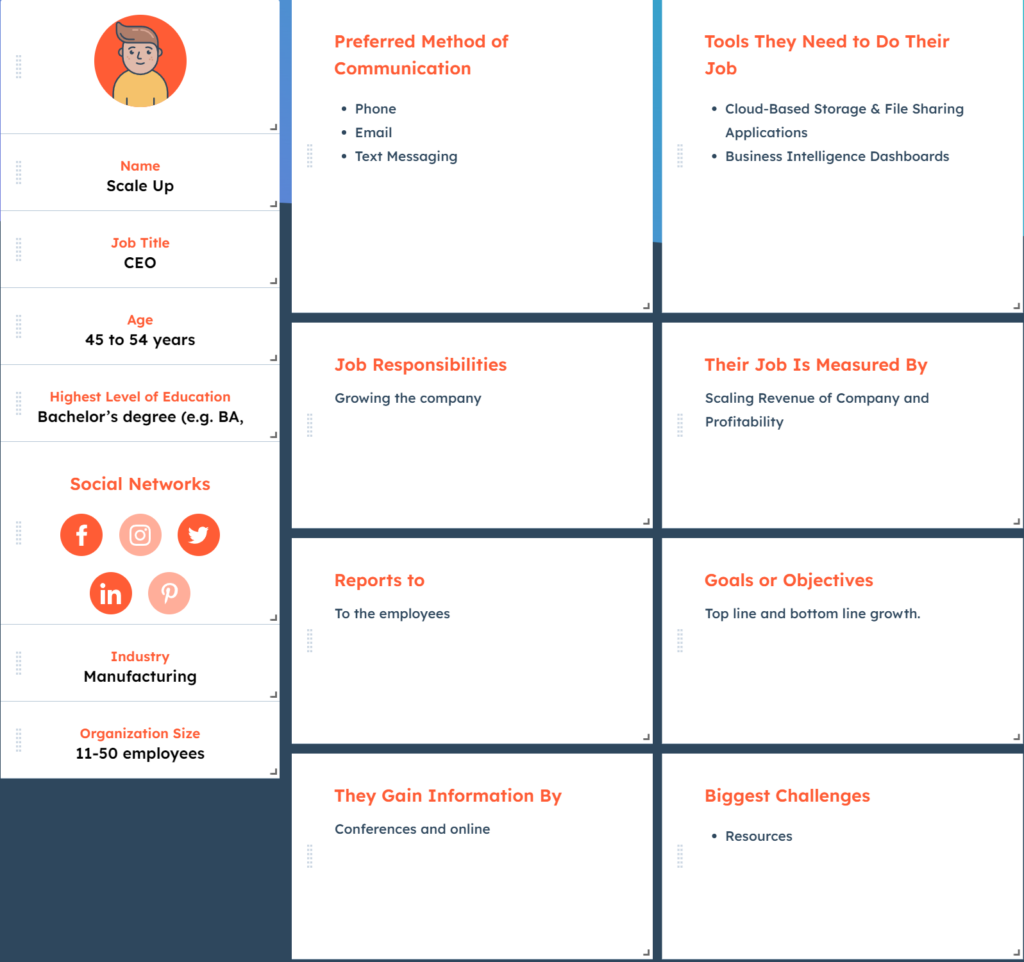
    First, audience signals. On Performance Max and other campaigns, you can tell Google who your best customers look like using your customer lists and in-market segments. This is a hint that speeds up learning, not a hard filter. It helps to define that ideal customer on paper first, so the signals you feed the algorithm match a real buyer.

    Client persona worksheet used to define the ideal customer for Google Ads optimization and audience signals Second, enhanced conversions. This feature sends hashed first-party data back to Google so it can match more conversions accurately, which sharpens every bid decision that follows. Third, budget pacing. A campaign capped too low starves its best hours. If a profitable campaign is limited by budget, raising the cap often buys more leads at the same cost per lead.

    Layering these signals with automation, rather than fighting the automation, is where experienced managers pull ahead. Search Engine Journal calls this automation layering: let Smart Bidding do the bidding, and spend your time on the inputs and the guardrails.

    Write Responsive Search Ads That Screen Out Bad Leads

    A responsive search ad mixes your headlines and descriptions into the combination Google thinks will perform best. Give it strong, varied material and it works for you. Give it filler and it wastes impressions.

    The goal for a lead-gen advertiser is not just clicks. It is the right clicks. Good ad copy screens the wrong lead out before the click costs you anything. For a company that buys and sells insurance leads, a headline set like this does two jobs at once:

    • Headline: “Exclusive Insurance Leads, Not Recycled”
    • Headline: “Real-Time Verified Calls & Forms”
    • Headline: “Set Your Own Volume and Filters”
    • Description: “Buy insurance leads on your terms. Exclusive or shared, verified in real time, priced to your budget. See how it works.”

    The word “exclusive” tells a bargain hunter this is not the cheapest list. That is the point. It costs you an impression to filter that person out instead of a click and a wasted follow-up. Write headlines that pre-qualify, then let the responsive ad find the best mix. For a deeper walk through the tools that speed this up, see our guide to the top PPC optimization tools for Google Ads.

    What Optimizing Google Ads Will Not Do

    Optimization makes a sound offer perform better. It does not rescue a broken one.

    If your landing page is slow, unclear, or asks for too much, no bid strategy will save it. If your offer is worse than the competitor two positions above you, a higher Quality Score buys you a cheaper click to the same weak page. And if your sales team is slow to call a new lead, the cheapest lead in your industry is still wasted. Optimization is the multiplier. The offer, the page, and the follow-up are the number it multiplies.

    Google Ads is also one channel. It works best beside the rest of your paid strategy. For the full picture of how paid search fits with everything else, read our complete guide to PPC marketing, and if you are weighing platforms, our comparison of Facebook Ads vs Google Ads.

    Frequently Asked Questions

    What is Google Ads optimization?

    Google Ads optimization is the ongoing work of adjusting a live account so it buys more business results for the same budget. It covers bid strategy, keywords and negative keywords, Quality Score, conversion tracking, audience signals, budget pacing, and ad copy. It is a loop you repeat, not a one-time setup.

    How often should I optimize a Google Ads account?

    Review the search-terms report and key metrics weekly, and make small changes then. Give any larger change, like a new bid strategy or target, about two weeks to gather data before you judge it. Changing settings daily prevents the automation from ever learning.

    Which bid strategy is best for lead generation?

    Most lead-gen accounts do best starting on Maximize Conversions to build conversion data, then moving to Target CPA once the cost per lead is stable. Target CPA lets you set a cost-per-lead goal directly. Manual bidding is rarely worth the effort on a modern account.

    How do negative keywords lower cost per lead?

    Negative keywords stop your ads from showing on searches that will not convert, so you stop paying for those clicks. Fewer wasted clicks at the same conversion count means a lower cost per lead. Review your search-terms report weekly and add negatives for irrelevant terms.

    Does Quality Score still matter?

    Yes. Quality Score reflects how relevant your ad and landing page are to a search, and a higher score earns a better position at a lower cost per click. You raise it by tightening the match between the keyword, the ad headline, and the landing page.

    Ready to Lower Your Cost Per Lead?

    Elevarus runs performance-driven paid media and lead generation for businesses that want measurable results, not activity reports. If you would rather have a team pulling these levers on your account, tell us what you need and we will show you how we would approach it.


    Work with Elevarus

    Are You Ready to Grow With a Proven Lead Generation & Performance Marketing Agency?

    Get a free, no-pressure strategy call with our lead-generation team. We'll map the fastest path to more qualified leads for your business.

    Book a free call →

    Ready to put this into action?

    Picture of <a href="https://elevarus.com/shane-mcintyre/">SHANE MCINTYRE</a>

    Founder and CEO of Elevarus, specializing in paid media, lead generation, pay-per-call, and customer acquisition.